Showing posts with label Galaxy. Show all posts

Disable the Auto Sync Pop-up message on Samsung Galaxy S7, S6, Note Series [NO ROOT]

April 14, 2016
Samsung's flagship devices, like the Galaxy S6, S7 and the Note Series, running on the latest Marshmallow version of android, are presently some of the best phones you can own. But they too have minor glitches and need UI refinements. 

One of such being the annoying pop-up dialogue box with the message "Enable auto sync" or "Disable auto sync", asking for confirmation each time one tries to enable/disable the auto sync from from the notification quick settings.
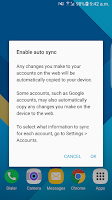
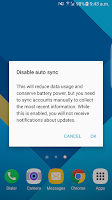
   

If you find the pop-ups unnecessary, this is the Best solution you can presently have without root. Here, we'll automate your phone to automatically click on the OK button and get rid of the stupid pop-up dialogue box.

(This solution will work on all android devices with this pop-up. S6, S6 edge, S6 edge+, S7, S7 edge, Note 5, etc are supported)

---

It's a Tasker solution & you'll need the following app: Tasker and AutoInput

**Tasker is a paid app (worth paying). You can also try to google "Tasker apk".
AutoInput is available free only for trial, but here is a trick: If you don't start the 7 day trial by logging in, you can use the app as lite version for free, forever, but with few limitations.**


PREREQUISITES:

  • Install both the apps on your device.
  • Enable tasker and turn off Beginners mode from its preferences. (If you're unfamiliar with it, just google)
  • Enable accessibility service for both the apps. (Settings -> Accessibility -> Under Services group)
  • Enable administrator access for both the apps. (Settings -> Lock screen & security -> Other security settings-> Device administrators)


Step 1: Long press on the Home icon at the bottom left and click on Add + and give your project a name. eg., Sync Auto OK


Step 2: In the tasker app, under Profiles, Create a new profile by clicking on the '+' at the bottom right.

Step 2

Step 3: Click on Event -> UI -> New Window
Step 4: Fill the fields as follows:

  • Label: Enable auto sync
  • Window Type: Dialog
  • Priority: Normal
Step 4


Step 5: Press the back button to save.
Step 6: In the next pop-up menu, Select New Task +
Step 7: Assign a task name (eg. Auto Click OK) & click on the Tick mark.

Step 7


Step 8: Now, Click on the '+' at the bottom center.
Step 9: In the pop-up menu, select Plugin -> AutoInput -> Action
Step 10: Now, click on the edit button (pencil) under configuration
Step 11: Under manual setup, select & fill in the following fields:

  • Action: Click
  • Field Type: Text
  • Field Text: type "OK" (without quotes)
  • Save the settings by clicking on the tick mark on top right of the screen.
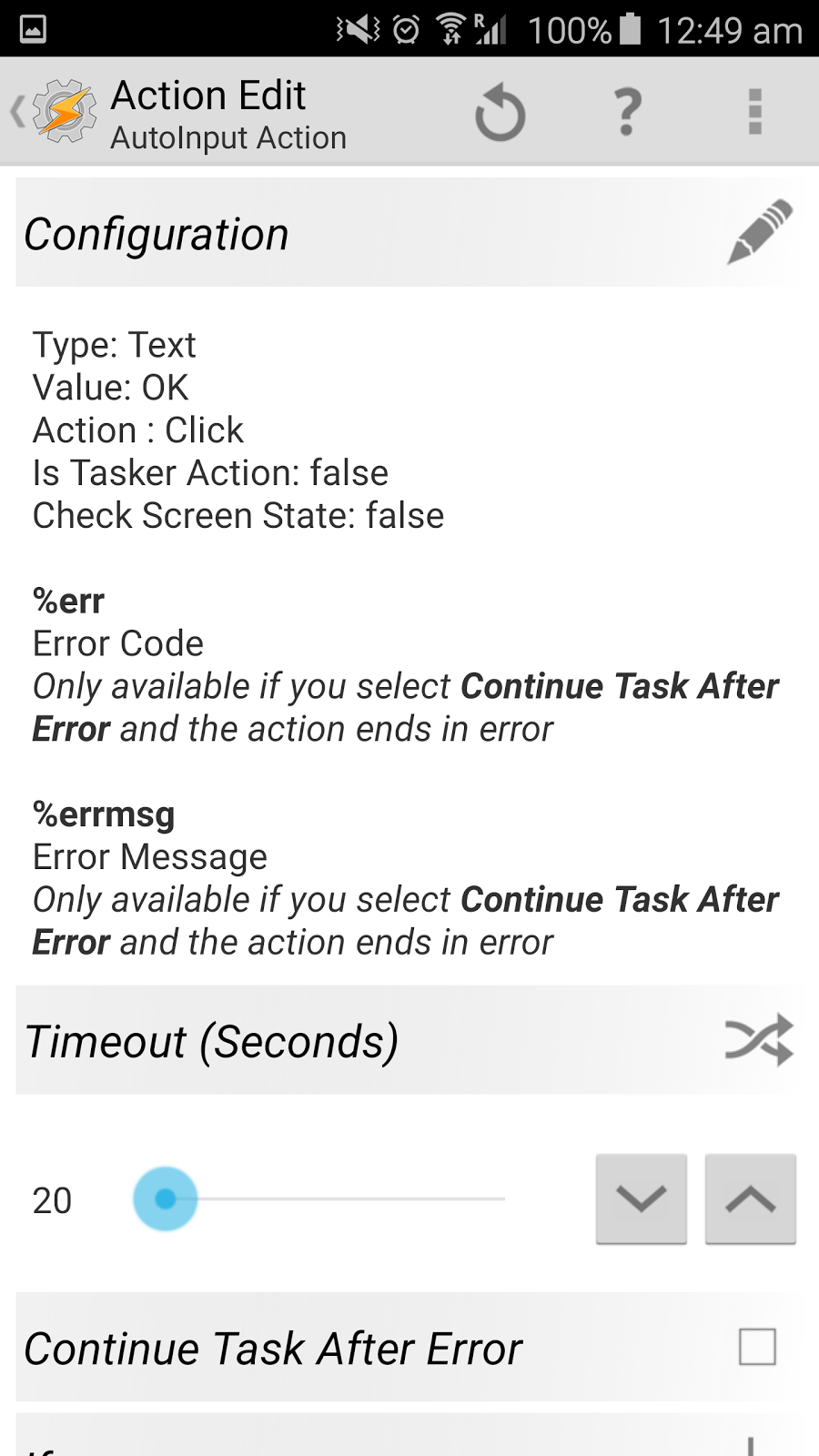
It should look like this after completing step from 8 to 11
Step 12: Press the back button twice.
Step 13: You should now be in the Profiles Tab, make sure everything looks like this:
Step 13

Step 14: Long press on the title of your profile ("New Window Enable auto sync, Dialog..") and select clone from the menu options. (Refer to the screenshots below)


Step 15: Click on the Event(trophy icon) from the second(cloned) profile and change the value of label from "Enable auto sync" to "Disable auto Sync" (without quotes).

Step 15
Step 16: Press the back button and make sure everything looks like this.

Step 16

You're done! Now you can exit from the app, & try turning on/off auto sync from the quick toggles & you'll notice how the pop-up gets dismissed automatically in less than a split second.

If you have any issues, you can comment below or contact through the Contact us page & I'll try to reply ASAP.

The above solution was successfully tested on Samsung Galaxy S6 edge running Marshmallow 6.0.1 with Tasker v4.8u1m & AutoInput v2.0


---
Disclaimer: This blog/owner of this blog disclaims all/any of the damage/loss caused to you/your device/data/etc due to use of the above stated method. You agree to perform the above at your own complete risk.
Best calculator apps for your Droid

Best calculator apps for your Droid

June 15, 2014
3 best calculator apps for your droid. 

Stock calculators are fine in use but they lack the extra features & excitement which 3rd party calculators can provide. 

1. CalcU

Developer: Hoot Apps

It is one of the best calculator apps available for Android. 
Truly made for a touch device with several gestural commands & haptic feedback.
It provides 12 beautiful themes for your pleasent experience! 
It includes buttons like ( ), sin, cos, tan, π, etc., with the upwards gesture of the screen. 

Download link: https://play.google.com/store/apps/details?id=com.candl.athena

2. Calculator Plus

Developer: digitalchemi

If you are a person who requires to perform business/tax calculations, this is the calculator for you. 
With well placed, big, clear buttons, you can enjoy your calculations. It contain the memory buttons(M+, M-, MR, MC) for business calculations & buttons like π, ¹/x, x², √x for other calculations.

It is a paid app, but a free version with ads is also available. 

Download link: https://play.google.com/store/apps/details?id=com.digitalchemy.calculator.decimal

3. RealCalc

Developer: Quartic Software

Definitely the best Scientific calculator for Android. 
Neat interface, big keys, clear Fonts, simply a no nonsense calculator which provides excellent experience with features like long press of buttons, keep screen on(screen light will not turn off while calculator is in use), unique history & many more. 
Searching for a scientific calculator, go nowhere else! 

Download link: http://market.android.com/search?q=pname:uk.co.nickfines.RealCalc

Do let us know in the comments how you liked them. 

Like, share, follow. 
Samsung being unfair with its Customers?

Samsung being unfair with its Customers?

June 13, 2014
According to a report by a reputed website, Samsung USA has confirmed that the International Version of the Samsung Galaxy S3 (i9300) will not be given an update of the latest Android Version, i.e., Kitkat 4.4.2.

The reason stated behind not providing the update is that the phone is not capable of downloading/handling the update as it has 1 GB of RAM.
     The contradiction is that Google has made Kitkat to run smoothly on phones with as low as only 512 MB RAM!!

The Phone performed well with Jelly Bean 4.2, but after the Jelly Bean 4.3 update, given by Samsung, the phone has become a piece of irritation & trouble; as all users of the phone have experienced. 

There is an never-ending list of problems that have come with the last update (Google it).
The battery lasts half the time now, phone gets heated up, lots of lag, slow browsing, and errors to name a few.

Now, Is it fair that Samsung provides the users a buggy update which ruins the phone and then makes the consumer suffer with it?

Samsung's Galaxy S3 had been the "Highest-selling phone of the year" & is still in the hands of a huge number of people.
People had spent more than INR 40,000 ($700 approx.) for a phone which didn't had so many bug in it.

Believing in the company, people upgraded their phones to official JB 4.3 and found themselves trapped with the bad update as it was said by SAMSUNG THAT ONCE UPGRADED, PEOPLE CANNOT DOWNGRADE TO JB 4.2

Shouldn't Samsung provide the JB 4.4 update or a proper update of JB 4.3 to resolve the issues? Isn't this cheating to sell a bug free phone at first, make it buggy with an update & then don't care about fixing it?

Many people have taken a resolute not to buy a Samsung again.
Does Samsung Care about its customers? The attitude says negative.

What are your views..? Let us know in the comments.

New Fresh Creative Whatsapp / Facebook Profile Pictures / DP for your social needs!

June 13, 2014

New Fresh Creative Whatsapp Facebook Profile Pictures / DP for your social needs!


Whatsapp Profile DP- Merry Christmas
 
Whatsapp Profile DP- Happy New Year 2015


Whatsapp Profile DP- Happy Halloween

Whatsapp DP- Examination!

Whatsapp Profile DP- Hot Sunner Weather

Whatsapp DP- Examination! 
Whatsapp Profile DP- Diwali Indian Festival

MORE COMING SOON.. CHECK OUT BEFORE EVERY OCCASION FOR MORE! :D

© RISHABH GUPTA. The copyright information written on the images must not be cropped or removed. You can use the images for non-commercial use but with proper credits & back link to this page. No commercial use of the images is allowed without written permission from the copy right owner. Failing these terms will call for Legal Actions.
Missing the old Inbox/Outbox/Sent Folder View of SMS in your Android Device?

Missing the old Inbox/Outbox/Sent Folder View of SMS in your Android Device?

June 08, 2014
Missing the old Inbox/Outbox/Sent Folder View of SMS in your Android Device?
Here is the Solution & its FREE..!! (Download link)

SMS Classic View - A simple app that categorizes SMS’s in the old fashioned Inbox, Sent, Draft, Failed etc folders.

Features:

1. Display SMS in Inbox, Sent, Draft folder view etc.
2. Display the count of SMS's.
3. Create new user folders.
4. Multiple delete/copy/move SMS's.
5. Encrypt SMS.
6. Write new SMS option.
7. Reply and forward option.
8. Select UI theme.
9. Send contact details as SMS.
10. Display contact name in list.
11. Blacklist contact to not get any SMS from that contact.
12. Select phone number, email id and url from a message.
13. SMS receive notification.
14. Call contact from SMS.

DOWNLOAD: https://play.google.com/store/apps/details?id=com.mymarketapp.smsclassicview&hl=en

Do follow the Blog.. :)
Missing the Nokia Reminder on Android? The Perfect Reminder app is here!!

Missing the Nokia Reminder on Android? The Perfect Reminder app is here!!

June 08, 2014
Nokia, once a leader with its S40 & S60 softwares, had the best event reminder. But now we have moved to android and the event reminder now is just a notification.
An event reminder in today's leading smartphone manufacturer- Samsung’s phones (and many other mobile companies) is merely a notification that one can easily miss and hence miss an important meeting, medicine reminder, pick-up, occasion, football/cricket match!
BUT now there is a solution!

CER- “Calender Event Reminder”
Never forget an appointment anymore! Perfect for business user!
Calendar Event Reminder (CER) adds a repeating calendar reminder and extends the stock calendar application. You can customize the duration, repetitions, sound and vibration pattern. Works with every synced calendar.After adjusting CER’s settings to your liking, add a calendar reminder to your existing calendar to see how it works! When alarm / reminder goes off the device will be turned on and a popup window with information about the event (title, time, location) is displayed. Alarm / reminder can be disabled by tapping Dismiss or snoozed by the Snooze button.
Watch a demo on YouTube: http://bit.ly/iXku5Y !!
    Features:
** Settings per calendar
** Repeating reminder / alarm alert for all synced calendars (even corporate calendar)
** Customizable vibration pattern / alarm sound** Lock screen style sliders or wheel to snooze / discard alarm
** Froyo / Gingerbread / ICS look & feel for sliders
** Text-to-Speech
** Stays open after every/last/no reminder
** Multiple snooze buttons with adjustable snooze logic and layout
** Wakes up device display automatically
** Shows notifications in the notification bar
** Supports LED flashing
** Supports to flash screen during alarm
** Customizable orientation
** Clean and simple
The app costs Rs.170/- ($3 approx.) but is totally worth paying if you want a perfect reminder!
Samsung Galaxy S5: Heart-rate Sensor? ALREADY IN YOUR PHONE..!!

Samsung Galaxy S5: Heart-rate Sensor? ALREADY IN YOUR PHONE..!!

February 25, 2014


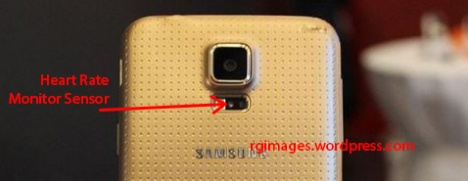
It showcased a new Heart Rate Monitoring Sensor, which is inbuilt into the back of the device.
Image
You would be surprised that your android phone too has the sensor & can Monitor your heart rate!!  (Isn’t that awesome!)
Just Download the app from the link given below & use your android device as heart-rate monitor. Its FREE too..!!
INSTANT HEART RATE MONITOR
★ The best Health & Fitness app on Mobile Premier Awards 2011 according to jury of industry experts ★
Instant Heart Rate is the most accurate Heart Rate Monitor app for any smartphone and it does not need any external hardware. Use it for optimizing your exercise and to track your progress. Install it now and keep fit.
Accuracy is constantly tested by fitness coaches, nurses, doctors, EMTs and 5 million users like you.
Enjoy The latest feature of the Galaxy S5 without spending a penny! :D
Enjoy.. Follow.. Comment…Thanks….!